

Welcome Page Body
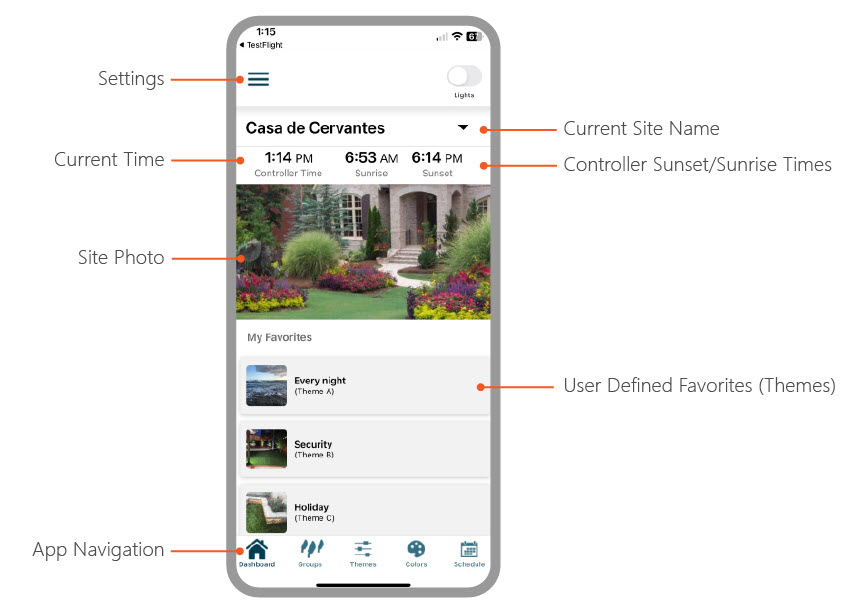
A Luxor system with a LAN connection or optional Wi-Fi Module installed can be operated manually and with the Themes mode utilizing an iOS or Android device. The FX Luminaire Luxor App can be downloaded from the following Application Stores:


The Luxor App will not function or initiate unless connected to a network via LAN connection or equipped with an optional WiFi module. NOTE: The device's processor should be 64 bit as 32 bit is not compatible.
Section Menu
Support Topics
Release Notes
-
Release Notes
Release Notes will list all the recent updates to the Luxor app for the Luxor Control system. It is always recommended that you download the most recent firmware to avoid future
Dashboard
-
Menu
The Settings Menu allows the user to view important information about the site, connectivity on the site, the Assign Lights tool, plus more. To learn more about the Settings, you
-
Add Image
If you are managing multiple sites on a property, it is a good idea to add an image for your home screen to help with site identification. Click on Add Image. Photo options
-
Add Favorite
Use the Favorites feature to pin your favorite lighting themes to the Home screen for easy access. You can also assign a custom image to each theme.
Sites
-
Luxor Cloud Setup
Before connecting to Luxor Cloud, make sure your Luxor controller is connected to the network router either by Wi Fi or LAN connection. Visit support section here to learn more
-
Site Setup
Sites allow you to easily manage multiple Luxor systems. Naming each site is essential as you navigate between them within the app.
-
Managing Multiple Controllers
If a site requires multiple Luxor controllers to manage different areas, the Luxor App supports adding up to ten controllers per site. It is recommended to stagger the group
-
Sharing Sites
Making sure everyone who should have access to the site controllers is important so they receive the information they need to control their Luxor from the cloud. Please use the
-
Alexa Integration
Luxor Alexa Skill enables voice control for your Alexa devices to control FX Luminaire outdoor lighting. In order to use the skill, you have to own Luxor Controller 2.0 model. You
-
Cloud FAQ's
The list below has the most frequently asked questions for Luxor Cloud as well as topics covered for troubleshooting. The four-digit verification code is not showing up on
Controllers
-
Controller Details
Controller Details will list and provide important information regarding the controller on the site. Tap the Menu icon on the upper left-hand side. Tap Controller List.
-
Chassis Load
Chassis load is a percentage that is displayed of the total load when the Luxor® is activated. Users can view the chassis load percentages directly from the Luxor App. This will
-
Error (Controller Belongs to Site)
The serial number you have entered is currently registered and associated with an existing account. For security and ownership verification purposes, this serial number cannot be
Groups
-
Add Groups
The Add Groups feature allows users to quickly add single or multiple groups within the app without the hassle of setting one at a time.
-
Group Details
Manage and customize your group settings with ease. This section allows you to: Edit Group Name: Personalize the name to reflect the group's purpose or identity. Assign
-
Group Color
The Luxor system adds Color to existing zoning and dimming options. A Color system requires that a ZDC LED board be installed into each desired FX LED fixture. Standard and ZD
-
Operating Groups
Operating lights in the Groups Mode is a manual process of turning lights on or off using 0-100% intensity without an ending time. Groups that are already running under a Program
Themes
-
Add Theme
A Theme is a planned set of groups at stated colors and intensities. A user can call up themes in the Program menu for quick setting of a series of groups or in the Manual menu for
Colors
-
Colors
The Luxor system adds Color to existing zoning and dimming options. A Color system requires that a ZDC LED board be installed into each desired FX LED fixture. Standard and ZD
Schedule
-
Create Schedule
The Schedules option within the app will allow the user to create programs that will be displayed on the schedule screen and allow you to Edit, Add, or Delete an event. The
-
Special Event
Special Event programming allows program(s) to run during specific dates throughout the year. Selecting Special Event will allow the controller to run the specified program during
Power Button (On/Off)
-
Power Button (On/Off)
The Power Button feature lets users activate lights using any available preprogrammed Theme. This is especially helpful for testing communication across all fixtures in the system.
Troubleshooting
-
Controller(s) Not Found
The Luxor App will scan for Luxor Controllers when opened. While the app is scanning, the screen will display CONNECTING TO CONTROLLERS. The app will first look for the last IP it
-
App Not Displaying Full Screen
You may be set to the Zoomed view if you are not displaying all the information on your iPhone or Android. To change this setting, set the view on your phone to Default using the
-
Groups/Themes Not Showing Up
When opening the app to display your groups, you will only see the groups that were added from the app. Groups added at the controller level will NOT automatically appear within
-
Troubleshooting Basics
PROBLEM CAUSE RESOLUTION Luxor App is crashing unnecessarily Luxor Controller firmware compatibility (e.g., 0.20) Be sure the Luxor
-
LAM Not Working
If your LAM (Light Assignment Module) is not working, we recommend checking the battery, verifying a good RSSI (signal strength), and using the Cloud Feature.
Demo Mode
-
Demo Mode
a { text-decoration: none; color: #464feb; } tr th, tr td { border: 1px solid #e6e6e6; } tr th { background-color: #f5f5f5; } Demo Mode lets
Setup Wizard
-
Setup Wizard
The Setup Wizard guides you through the essential steps to get your system up and running quickly. NOTE: This option is only available when Cloud mode is enabled.
Light Assignment Accessories
-
Light Assignment Module (LAM)
The LAM is a device that wirelessly assigns FX LED fixtures with ZD Technology® to Groups ranging from 1-250. The LAM plugs into the headphone jack of a smartphone or tablet. Click
-
LumaKey™ Utility
The LumaKey™ Utility is a device that wirelessly assigns low-voltage LED fixtures with Luxor Technology™ to groups. To use the LumaKey™ Utility, confirm that Bluetooth is enabled
Backup Database
-
Backup Database
To keep your data safe and secure, our app includes a built-in database backup feature. Backing up your database ensures that your information—such as settings, schedules, groups,