

Welcome Page Body
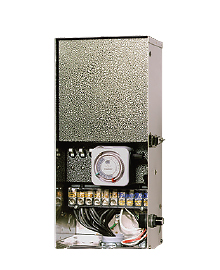
Welcome to the PX Transformer Support Section. This installation guide is designed to walk you through the proper methods of installing your new lighting system. The PX Transformer is the “heart” of your system. Its function is to provide a safe and consistent flow of proper electrical power to each of the fixtures installed.

Section Menu
Support Topics
Installation
-
Overview
304 stainless steel cabinet Magnetic circuit breaker 120 V accessory receptacle Terminal block 120 V wiring compartment cover 120 V power cord 6' (1.8 m) This
-
Locating the transformer
Locate transformer(s) in a well ventilated area away from direct irrigation spray and central to where the majority of the lighting fixtures will be installed. The goal is to
-
Mounting the transformer
Install transformer(s) in a well-ventilated area away from direct irrigation spray and central to the proposed installation site. Mark the position of the top of the keyhole
-
Running cable to fixtures
Once the transformer has been installed and all fixture locations determined, the next step is to run the correct size cable from the transformer to the fixtures while providing
Programming
-
Timer
The timer in the FX is simply plugged into receptacle in the PX transformer. The timer switching option provides an automatic method of turning your lighting system on and off at
-
Photocell
The photocell switching option is a light sensitive device that allows your FX lighting system to become active at dusk and then shuts the system down when the sun comes up thus
Troubleshooting
-
Troubleshooting Guide
It is challenging to troubleshoot an electrical system without the proper tools. The two most essential diagnostic tools used for electrical troubleshooting are the digital
-
Incoming Power Testing
The power path of your PX Power Transformer begins at the Electrical Panel (1). Inside the panel is a series of Circuit Breakers, one of which feeds 120 volts of power to the
-
Circuit overload/short circuit
If the circuit breakers (6) on the face of the transformer keep tripping, the system is experiencing either a circuit overload or there is a short in the system. 1. Electrical
-
Photocell not Working
Remove the timer (if applicable) and place a black bootie over the PhotoCell (PC). Wait 2 minutes, then perform a voltage test by placing one of your voltmeter probes on "120 Volt
-
Testing Transformer Power
The first test to perform will determine if power is passing through the transformer and any switching devices (timer, photocell) to the low voltage taps. If the transformer
FAQs
-
Dimming
Dimming control is one of the most important tasks a lighting designer can address to ensure the system fits the owner's lifestyle and utility needs. The PX/EX lighting control
-
Maintenance
Periodic system maintenance is required to keep your FX lighting system operating at peak performance. Practicing these maintenance suggestions will lengthen the life and enjoyment
-
Lamp Life
Lamp life is rated in hours of operation. If lamps are rated for 4000 hours at 12 volts, it means that at 4000 hours, 50% of the lamps are still working and 50% are not. For
-
Using a PX-SYNC
You can use your Hunter irrigation controller to activate both the PX power transformer and your irrigation controller.. All Hunter controllers come with a pump/master valve (P/MV)
-
Warranty
The PX Transformer is warranted from manufacturer's defects for a period of ten years from the date of installation. If the transformer should fail due to manufacturing defects
Compliance
-
Compliance
UL-1838 UL-379 Pool & Spa EX-150 EX-150-SS Only PX (All Models) PX-150, PX-600, PX-900 DX (All Models) DX (All