

The SRP-CC Strip Light Color Controller requires the SRP-RGBW fixture to operate correctly. This is compatible with all lighting transformers, including the EX Transformer, PX Transformer, DX Controller, and Luxor® Controller from FX Luminaire. It is compatible only with the FX Luminaire SRP RGBW Strip Light. To power the controller, connect its low-voltage wires to the output (common and voltage taps) of the low-voltage transformer.
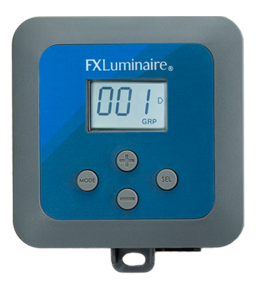
The SRP-CC display illuminates only if the low-voltage transformer is supplying output voltage (minimum 12 VAC).
Controller Mounting Setting Up Standalone Mode Setting Up Luxor Mode Strip Light Installation

- Drill ⅛" (3 mm) pilot holes into the mounting surface. Insert anchors and install screws into the anchors, leaving approximately ⅛" of thread exposed. Mount the controller.
- Mark locations for the bottom anchors with a permanent marker.
- Remove the controller from the wall. Drill bottom anchor holes and install the anchors.
- To secure the controller to the wall, place it back on top of the anchors.
- Install the screw(s) into the anchors at the bottom of the controller.
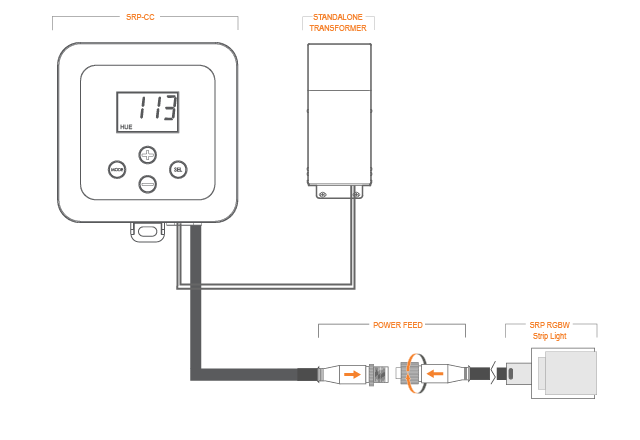
The stand-alone mode option works with any low-voltage transformer (e.g., EX, DX, PX, etc.).
NOTE: The max run length of fixture is 20’ per SRP-CC.
- Attach the SRP-CC low-voltage wires to the output taps or field wires connected to the on-site low voltage transformer.
- To power the SRP RGBW Strip Light, connect the SRP-CC power feed cable to the strip light power feed cable.
- Turn on the low-voltage transformer manually to confirm the output voltage is at least 12 VAC.
- Confirm that the SRP-CC display is illuminated.
- Verify that the Hue, Saturation, or Intensity are displayed. This confirms that the SRP-CC is in Standalone Mode.
- If GRP (Luxor Mode) is displayed, press the Mode

- Once in Standalone Mode, the SRP-RGBW Strip Light will illuminate according to the selected Hue, Saturation, and Intensity values.
- To toggle between Hue, Saturation, and Intensity, press the Select

- Use the Plus


- Hue: 0 to 360
- Saturation: 0 to 100
- Intensity: 0 to 100
NOTE: The max run length of fixture is 20’ per SRP-CC.
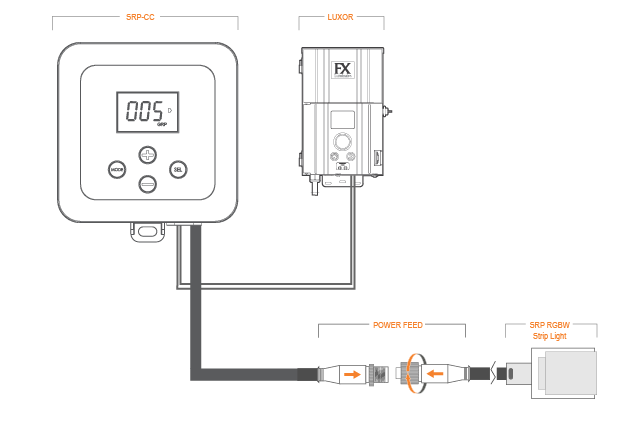
- Attach the SRP-CC low-voltage wires to the output taps (Common and 15 V) or field wires connected to the on-site Luxor Controller.
- To power the SRP RGBW Strip Light, connect the SRP-CC power feed cable to the strip light power feed cable.
- Turn on the Luxor Controller manually to confirm the output voltage is at least 12 VAC.
- Confirm that the SRP-CC display is illuminated.
- Confirm that GRP (Luxor Mode) is displayed at the bottom of the screen.
- If HUE, SAT, or INT is displayed, press MODE
- Once in Luxor Mode, the SRP-RGBW Strip Light will be controlled using the Luxor Controller. Set GRP to the desired group. Use
- Program the color and intensity using the Luxor Controller interface or Luxor App.
NOTE: The Select
Still need help? We're here.
Tell us what you need support with and we'll find the best solution for you.